
Head-to-head comparison
Bambu Lab A1 vs P2S: is the enclosed frame worth it?
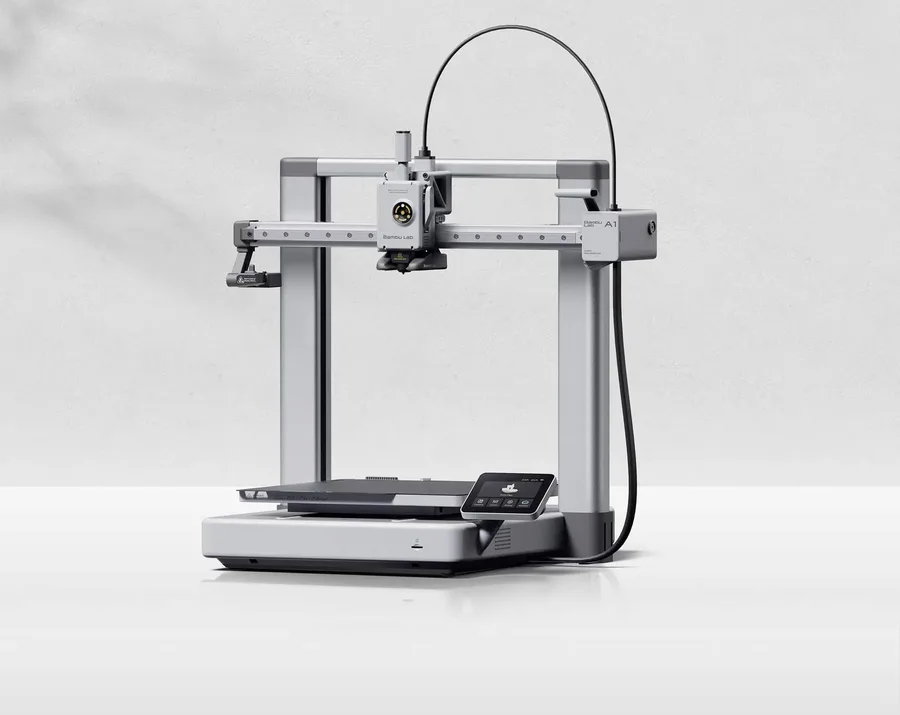
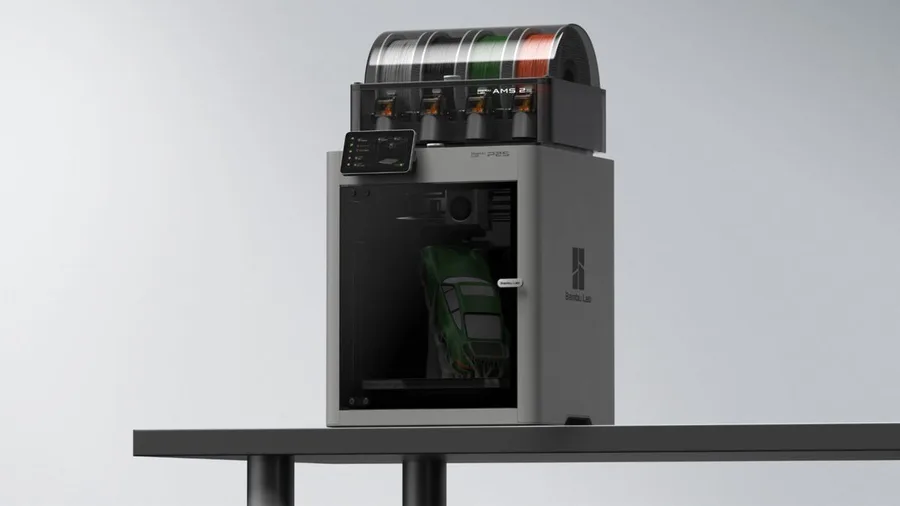
The short answer
Pick the A1 for a light, affordable first printer for PLA and PETG, with AMS lite optional and a simple open frame to set up. Pick the P2S for an enclosed frame that widens compatible materials (ABS, ASA, TPU, PA, PC…), a 110°C bed versus 100°C, twice the advertised top acceleration, and a 1920 × 1080 camera at 30 frames per second.
Documentary comparison of manufacturer specifications. Not personally tested.
Choose the Bambu Lab A1 if…
- The same 256 × 256 × 256 mm nominal volume as the P2S, but an open frame that's far lighter (8.3 kg versus 14.9 kg), easier to move around.
- AMS lite optional for lighter multicolor printing, without paying for the P2S's enclosed frame.
- An open structure that's enough for PLA and PETG per Bambu Lab's profiles, with no enclosure to heat unnecessarily for those materials.
- A more modest advertised acceleration (10,000 mm/s²) but simpler mechanics, with a camera and filament sensor built in from the base configuration.
Choose the Bambu Lab P2S if…
- An enclosed frame that widens official material compatibility to ABS, ASA, TPU, PA, PC, PVA and several composites, versus PLA and PETG for the A1.
- A bed heated to 110°C versus 100°C on the A1, and a top acceleration advertised at twice the rate (20,000 mm/s² versus 10,000 mm/s²) per Bambu Lab.
- An activated carbon filter specific to the enclosed frame, and a camera with a stated resolution (1920 × 1080 at 30 frames per second) on the manufacturer's sheet.
- AMS 2 Pro compatibility with a documented drying function, for more advanced multicolor printing than the A1's AMS lite.
Specifications side by side
| Specification | Bambu Lab A1 | Bambu Lab P2S |
|---|---|---|
| Technology | Filament (FDM) | Filament (FDM) |
| Build volume | 256 × 256 × 256 mm (10.1 × 10.1 × 10.1 in) | 256 × 256 × 256 mm (10.1 × 10.1 × 10.1 in) |
| Printer dimensions | 465 × 410 × 430 mm (18.3 × 16.1 × 16.9 in) | 392 × 406 × 478 mm (15.4 × 16 × 18.8 in) |
| Weight | 8.3 kg (18.3 lb) | 14.9 kg (32.8 lb) |
| Enclosure | Open frame | Enclosed |
| Claimed top speed | 500 mm/s | 600 mm/s |
| Claimed acceleration | 10,000 mm/s² | 20,000 mm/s² |
| Max nozzle temperature | 300 °C (572 °F) | 300 °C (572 °F) |
| Max bed temperature | 100 °C (212 °F) | 110 °C (230 °F) |
| Multicolor | AMS lite; check the exact bundle. | AMS 2 Pro compatible; check the Combo contents. |
| Materials | PLA and PETG with manufacturer profiles. | PLA, PETG, ABS, ASA, TPU, PET, PA, PC, PVA and composites (PLA-CF, PETG-CF, ABS-GF, ASA-CF, PA6-CF, PPA-CF, PET-CF…) per Bambu Lab's spec sheet; check the right profile and nozzle for each material. |
| Screen | 3.5-inch touchscreen | 5-inch touchscreen |
| Built-in camera | Yes | Yes |
| Connectivity | Wi-Fi, microSD card | Wi-Fi, USB |
| Listed features | Filament runout sensor, filament cutter | Filament runout sensor, filament cutter, built-in air filtration |
— : not listed by the manufacturer on the pages we reviewed.
Build volume and footprint
The A1 and P2S share the exact same 256 × 256 × 256 mm nominal volume per Bambu Lab: the choice isn't about part size but about the machine's architecture, open for one, enclosed for the other.
On the floor, the A1 takes up 465 × 410 × 430 mm at 8.3 kg versus 392 × 406 × 478 mm and 14.9 kg for the P2S: the A1 is wider and shorter with no enclosure walls, while the P2S trades width for height. On a shallow shelf, that footprint gap can matter as much as the weight.
Speed and motion
Bambu Lab advertises a top speed of 500 mm/s for the A1 versus 600 mm/s for the P2S, a moderate gap. The difference widens on maximum acceleration: 10,000 mm/s² for the A1 versus 20,000 mm/s² for the P2S, double the rate.
These manufacturer numbers remain a theoretical ceiling: actual print time depends mostly on the slicer profile, part geometry, and material used on both machines. For occasional use, this mechanical gap often matters less than the enclosed-frame question.
Materials, temperatures and enclosure
Both hotends reach 300°C per Bambu Lab: the temperature gap is on the bed, 100°C for the A1 versus 110°C for the P2S. The A1 is advertised for PLA and PETG per the manufacturer's profiles, a deliberately narrower compatibility for an open frame.
The P2S, thanks to its enclosed frame, extends official compatibility to ABS, ASA, TPU, PET, PA, PC, PVA, and a range of composites (PLA-CF, PETG-CF, ABS-GF, ASA-CF, PA6-CF, PPA-CF…). The A1's open frame is not a substitute for an enclosure with these materials, which shrink while cooling; the budget buying guide and the PLA vs PETG guide help frame a first project on an open-frame machine.
Multicolor
The A1 is compatible with AMS lite, a lighter version designed for the A series' open frame per Bambu Lab. The P2S relies on the AMS 2 Pro, with a drying function documented by the manufacturer, useful for moisture-sensitive filaments like nylon.
Neither system is required to print: both are add-ons for automating spool changes or combining several colors. The multicolor buying guide covers the gap between AMS lite and AMS 2 Pro before you choose, and when the accessory is actually worth it.
Everyday features
Both printers include a touchscreen, a camera, and a filament sensor per Bambu Lab: 3.5 inches with Wi-Fi and a microSD slot for the A1, versus 5 inches with Wi-Fi and USB for the P2S. The P2S states a camera resolution of 1920 × 1080 at 30 frames per second; the A1's isn't listed on the sheet checked. Both include a built-in filament cutter.
The A1's open frame has no enclosure to filter, unlike the P2S, which advertises an activated carbon filter against VOCs and particles. Before buying, check whether your chosen listing includes the AMS lite or the AMS 2 Pro: these multicolor accessories are most often sold separately depending on the bundle.
Sources
- Bambu Lab — fiche technique A1 (bambulab.com)
- Bambu Lab — fiche technique P2S (bambulab.com)
- How we compare printers
Published 2026-09-28, updated 2026-09-28.