
Klipper: The Firmware That Moves the Math to a Computer
Klipper comes up constantly in talk about print speed and sharper corners. This page covers what the firmware actually does, which printers already ship with it out of the box, and what that changes in daily use.
Find My 3D Printer editorial team·Published September 16, 2026·Manufacturer documentation, no hands-on tests claimed

The short answer
Klipper is an open-source 3D printing firmware that splits the work between a computer (like a Raspberry Pi or an equivalent board) that calculates trajectories, and the mainboard's microcontroller, which executes those movements with a precision of 25 microseconds or better, per the project's official documentation. That architecture enables features like input shaping, which cuts vibration and ringing, and pressure advance, which reduces ooze in corners. Several manufacturers, including Creality, Sovol, QIDI, and Elegoo, now ship certain models with Klipper pre-installed instead of a standard Marlin firmware.
Klipper's different architecture
A traditional 3D printer firmware like Marlin runs entirely on the mainboard's microcontroller, a fairly weak chip built to drive motors, not to run heavy math. Klipper changes that setup: per the project's official documentation, trajectory and kinematics calculations happen on a separate computer, usually a Raspberry Pi or an equivalent board, which then sends precise commands to the microcontroller, whose only job is executing them with, per that same documentation, a precision of 25 microseconds or better.
Offloading the math to a more powerful computer allows more complex trajectories without overloading the microcontroller, which opens the door to higher speeds and accelerations than a firmware that does everything locally, on otherwise identical hardware. Klipper remains free, open-source software, released under the GNU GPL v3 license and available on the project's GitHub repository, where its contributor community maintains the code and documentation.
That split has a trade-off: Klipper depends on a working companion computer to run, unlike a self-contained firmware like Marlin that runs entirely on the mainboard. A power cut or a poorly powered companion computer can interrupt a print in a different way than a purely embedded firmware would, worth keeping in mind when wiring up the whole setup.
Input shaping and pressure advance: the two headline features
Input shaping compensates for mechanical resonance: it measures or estimates the printer frame's natural frequencies, then adjusts motor commands to reduce ringing (the faint waves visible near a sharp corner) and ghosting caused by vibration. This feature, described in Klipper's documentation under Resonance Compensation, is one of the reasons most often cited by people who switch to this firmware.
Pressure advance adjusts the pressure of material inside the nozzle by anticipating speed changes, cutting ooze at the start and end of an extrusion segment, which shows up mostly on corners and fine detail. Both features are calibrated separately, usually through test prints, and a compatible slicer like OrcaSlicer bundles dedicated tools to run these calibrations without touching a command-line console.
Which printers ship with Klipper out of the box
Several manufacturers now install Klipper by default instead of leaving the conversion to the buyer. The Creality K1 runs a Creality-adapted build of Klipper, with code published on a dedicated project repository. The Sovol SV08, derived from the Voron architecture, also runs on Klipper out of the box, with firmware and source published by Sovol.
The QIDI Q1 Pro also runs Klipper, with a Klipper fork and a Moonraker server maintained by QIDI according to their official GitHub pages. Per Elegoo's product page, the Neptune 4 ships with Klipper pre-installed on a 64-bit ARM board, illustrating a broader market trend toward shipping Klipper natively rather than treating it as a conversion reserved for advanced users.
Factory-installed Klipper vs. a conversion: what's different
A printer that ships with Klipper arrives already configured by the manufacturer, with profiles and an interface tailored to that specific model, skipping the manual printer.cfg setup step. A conversion, by contrast, means installing Klipper yourself on a printer originally designed for Marlin, which involves configuring pins, sensors, and kinematics by hand from an existing config file or a close example.
Factory-installed builds of Klipper are sometimes modified, locked-down, or behind the project's main branch, a point raised by the community around several consumer machines. Moving to a build closer to the project's official repository is possible on many of these printers, but takes more work than a simple update from the printer's screen.
For a first-time buyer, this mostly matters when picking a printer: a machine that already ships with Klipper skips this question at the start, leaving a move to a more recent build for later, once the basics of calibration are second nature.
Multiple microcontrollers, macros, and a config file: what the architecture enables beyond speed
Klipper's official documentation lists capabilities that get less attention than input shaping but shape the experience just as much. One printer can be driven by several microcontrollers, one for the extruder, another for the heaters, a third for everything else, with the host software synchronizing their clocks: it takes only a few extra lines in the configuration file, which is why recent machines can run a toolhead over a single cable.
The entire configuration lives in a text file, with no need to reflash the microcontroller to change a setting, and that same file accepts programmable macros: new G-code commands defined by the user, whose behavior can depend on the printer's state. The documentation also mentions a built-in JSON API server, which web interfaces and third-party apps build on.
On performance, the project states that even an old 8-bit microcontroller exceeds 175,000 steps per second and that recent microcontrollers reach several million, with every step still scheduled to within 25 microseconds. The code is described as hardware agnostic and portable across ARM, AVR, and PRU chips, which is what lets you keep an existing printer's mainboard and add only a companion computer, as our guide to types of 3D printers points out.
Mainsail and Fluidd: running Klipper from a browser
Klipper has no screen or built-in graphical interface: it relies on Moonraker, an API that exposes its functions, and on a web interface like Mainsail or Fluidd to run the printer from a browser. These interfaces show the camera feed if one is installed, temperature settings, the list of G-code files, and give access to macros and Klipper-specific calibrations.
On a printer that ships with Klipper from the factory, the built-in touchscreen often mirrors part of these functions in a simplified, brand-specific interface, while Mainsail or Fluidd stay available in parallel from a computer or phone on the same network, which is handy for keeping an eye on a print without standing next to the machine.
What to know before converting an existing printer
Installing Klipper on a printer built for Marlin needs a companion computer (a Raspberry Pi or equivalent), a mainboard compatible with Klipper's microcontroller firmware, and a configuration file matching that specific model, usually found among the examples shipped with the project or shared by the community. This is a deeper change to how the machine runs than a simple firmware update.
An unofficial conversion almost always falls outside the manufacturer's intended use and can affect the warranty, something worth checking with support before starting. For a first printer, picking a model that already ships with Klipper configured skips this step and its risks, at the cost of a narrower selection than the full Marlin market.
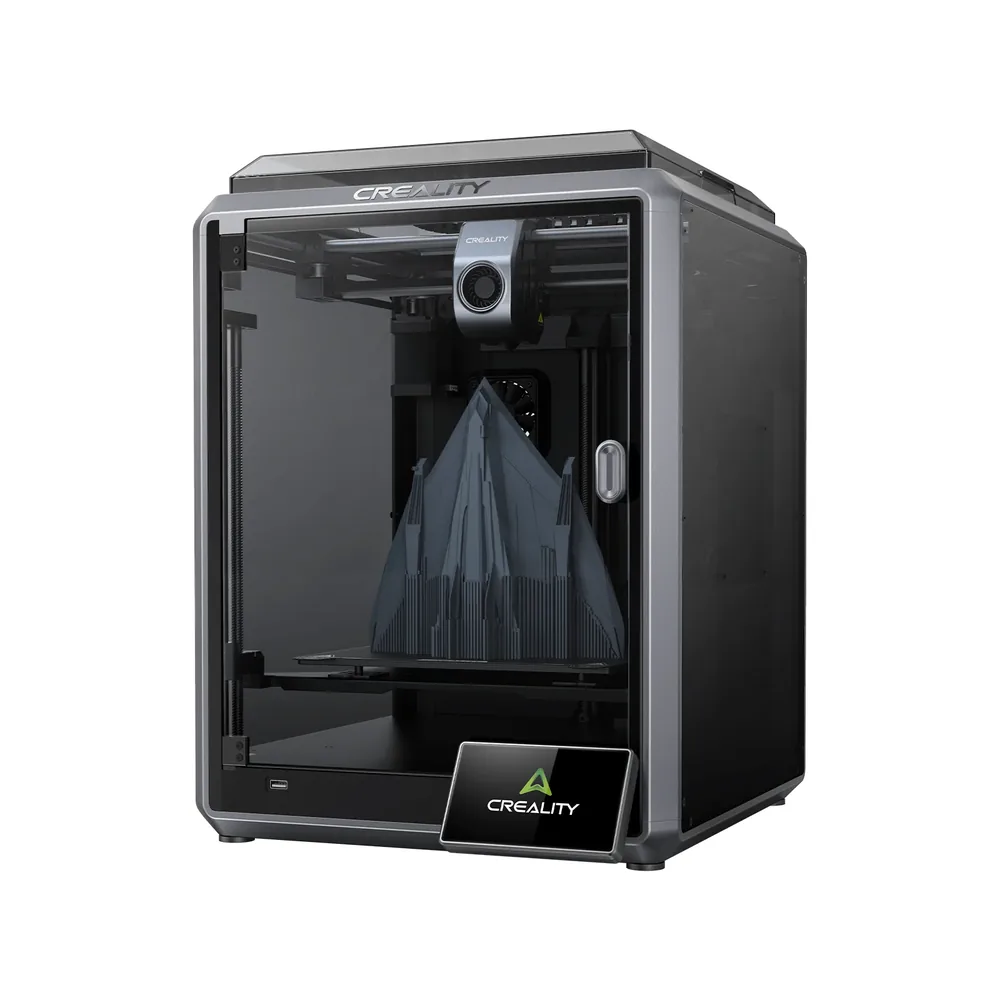
Creality K1
220 × 220 × 250 mm
An enclosed die-cast aluminum alloy chassis with glass panels, hands-free automatic leveling, and a top speed advertised at 600 mm/s.
The AI monitoring camera is offered as an option on this base model; check whether it's included in your chosen listing.
Specifications and seller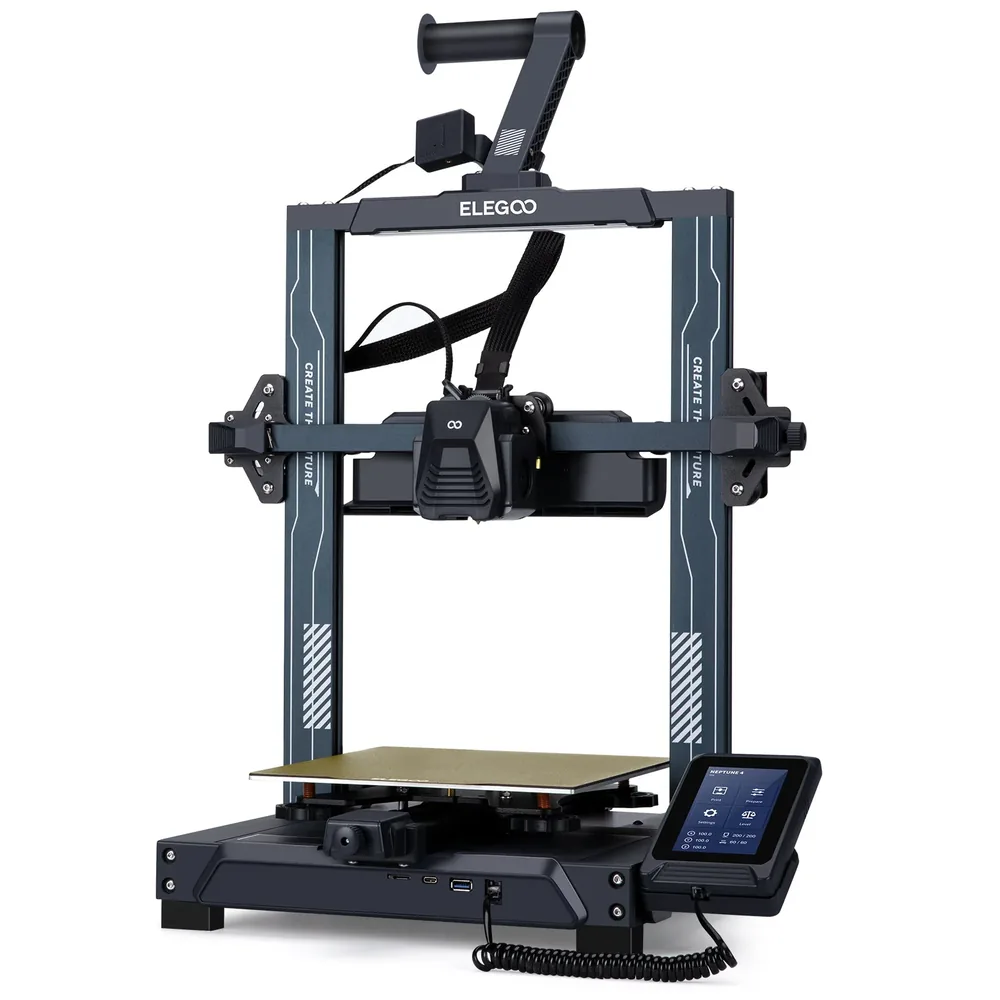
Elegoo Neptune 4
225 × 225 × 265 mm
121-point auto leveling, Klipper firmware pre-installed with input shaping and pressure advance, a dual-sided PEI/PLA build plate, and USB/LAN connectivity at an entry-level price per Elegoo.
Open frame with no Wi-Fi or camera: ABS and ASA need a separately sold enclosure, and the exact box contents beyond the base unit and screen should be checked on the retailer's listing.
Specifications and seller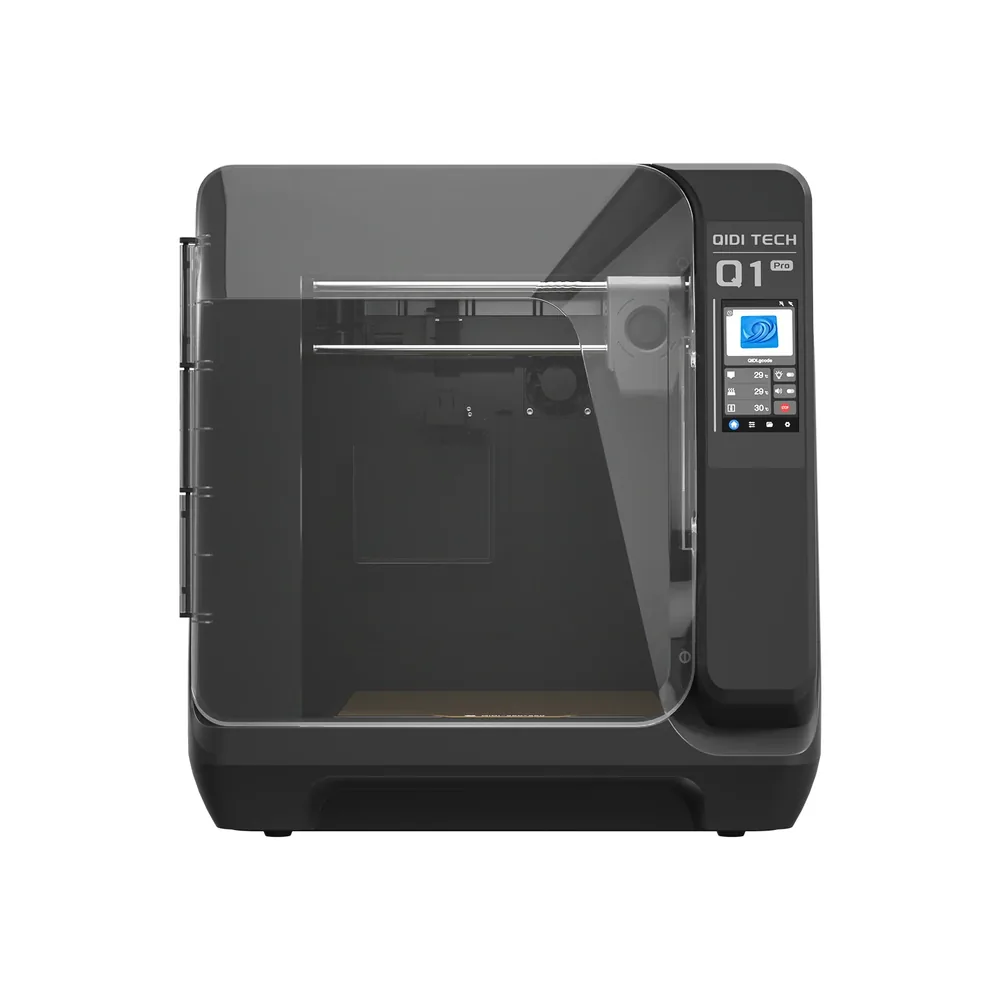
QIDI Tech Q1 Pro
245 × 245 × 240 mm
An actively heated chamber up to 60°C, a nozzle advertised up to 350°C, and a bed up to 120°C per QIDI, a rare combination at this compact size.
QIDI lists this model as discontinued (its listing shows sold out) and points buyers to the QIDI Q2 as a successor; new-unit availability isn't guaranteed.
Specifications and seller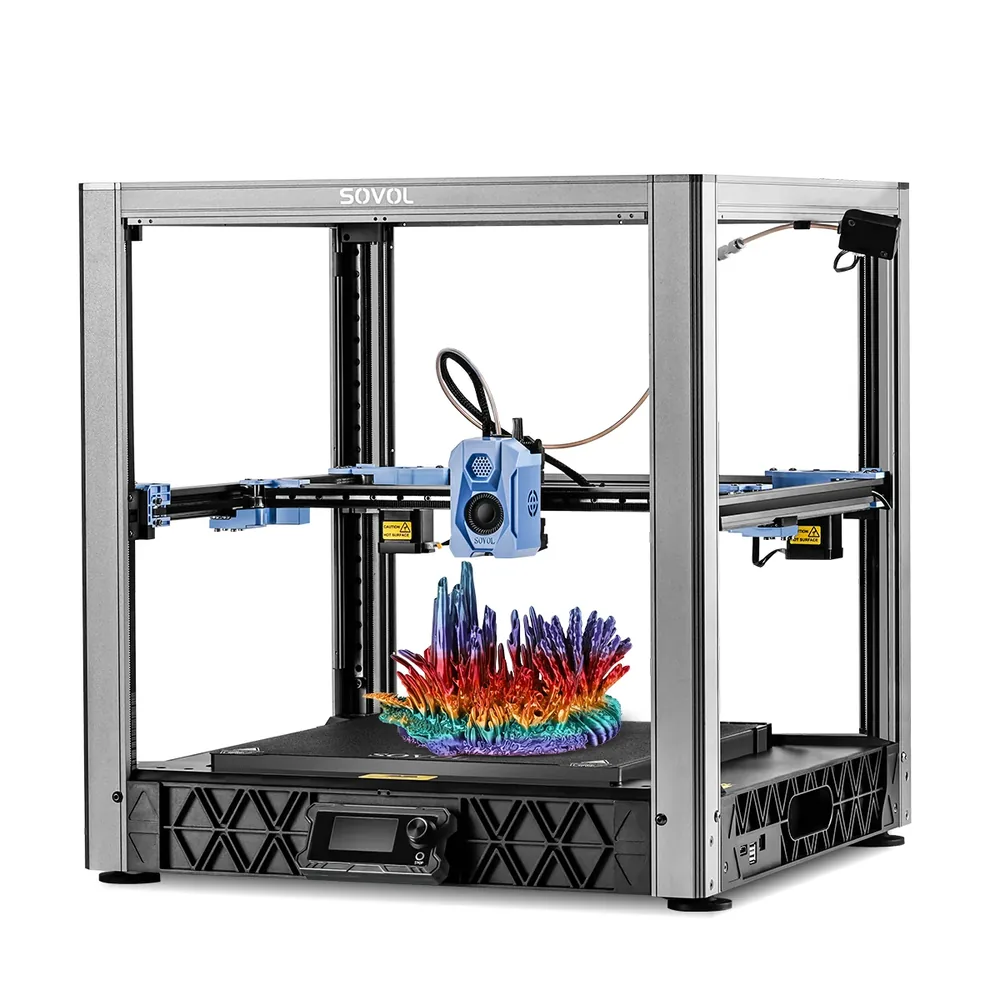
Sovol SV08
350 × 350 × 345 mm
A CoreXY kinematics inspired by the Voron 2.4 with four independent Z motors, a top speed advertised at 700 mm/s and acceleration up to 40,000 mm/s² per Sovol, an open-source kit shipped 90% assembled.
The chassis stays open; an enclosure is sold separately. The exact box contents aren't detailed on the manufacturer's listing, check before buying.
Specifications and sellerSources and limits
- Klipper — Overview (host + microcontroller architecture)
- Klipper — Features (input shaper, pressure advance)
- GitHub — Klipper3d/klipper (main repository, license)
- GitHub — CrealityOfficial/K1_Series_Klipper (Creality K1 firmware)
- Elegoo — Neptune 4 FDM 3D Printer (Klipper pre-installed)
We organize manufacturer and community documentation; we have not measured these products ourselves. The manual for your exact model takes precedence over general guidance.
A clearer shortlist starts with your projects.
Use the free buying checklist and budget worksheet before comparing offers.