
How Does a 3D Printer Work, From File to Finished Part?
A 3D printer builds an object layer by layer from a digital file, but what actually happens between clicking print and holding the finished part stays fuzzy for a lot of beginners. This page breaks down the process, by technology and by component, so you understand what the machine is actually doing.
Find My 3D Printer editorial team·Published September 10, 2026·Updated September 16, 2026·Manufacturer documentation, no hands-on tests claimed

The short answer
A 3D printer works in three stages: modeling or downloading a 3D file, slicing it with software that cuts the model into thin layers and generates G-code, then the print itself, where the firmware drives the motors, heaters, and sensors to deposit or cure material layer by layer. An FDM printer melts filament and lays it down through a nozzle; an MSLA resin printer cures liquid resin with UV light through an LCD screen. Layers stay visible, and some shapes, like steep overhangs, run into physical limits that come with additive manufacturing itself.
From 3D file to G-code: what happens before printing starts
It all starts with a 3D file, either modeled in CAD software or downloaded as an STL or 3MF file. That file describes a three-dimensional surface, but a printer cannot read that geometry directly: it first has to go through a slicer, software like the ones covered in our software section, which cuts the model into dozens or hundreds of thin horizontal layers.
For each layer, the slicer works out the exact path the nozzle should follow, or which area the resin screen should cure, along with the speed, temperature, and infill to apply. The result is called G-code: a long list of instructions, one coordinate at a time, that the printer's board executes one by one during the print, as the Prusa Knowledge Base's FFF/FDM glossary explains.
FDM explained component by component
On an FDM printer, filament comes off a spool and feeds into the extruder, a geared mechanism that grips the filament and pushes it forward at the speed the G-code specifies. Some machines mount the extruder right above the print head (direct drive), others place it farther away and connect the two with a tube (Bowden); both approaches do the same job, pushing filament precisely.
The filament then enters the hotend, which heats it until it melts, and finally the nozzle, the metal tip that shapes the bead of material as it lands on the bed. The bed, often heated, is the surface the part builds on, and it needs to be level so the first layer sticks properly. Sensors round out the system: a filament sensor catches a break or an empty spool, and a leveling probe measures the bed's height before the print starts.
MSLA resin printing explained: screen, UV LEDs, and a rising plate
An MSLA resin printer works very differently: it does not extrude anything. A vat holds liquid, light-sensitive resin, and an LCD screen sitting under that vat acts as a digital mask, letting UV light through only where a layer needs to cure. An array of UV LEDs, positioned below the screen, supplies the light; the screen allows or blocks it pixel by pixel, layer after layer.
The build plate lowers into the vat, gets close to the clear bottom, and the exposed layer cures all at once across its whole surface. It then rises slightly so resin can flow back under the part before the next layer. Per Elegoo's resin printing beginner's guide, the part comes off the printer still tacky with uncured resin and needs to be washed and then post-cured under UV light before it is safe to handle freely, in a well-ventilated space.
What the firmware does during a print
Firmware is the program that runs on the printer's control board. It reads G-code line by line and turns each instruction into a physical action: spin a specific stepper motor by a set angle, heat a specific heater to a target temperature, switch on a fan. It also continuously watches the temperature sensors and cuts the heat if something looks wrong, a basic safety mechanism on any modern printer.
Firmware is also what handles power-loss recovery on printers that support it, or pauses a print when a filament sensor stops detecting material. Without it, G-code would stay a plain text file: it is the required middleman between the slicer's calculations and the machine's actual movement.
On consumer FDM printers, that role usually falls to a firmware like Marlin or Klipper, tuned by the manufacturer with values specific to its machine, axis travel, acceleration, heating curves. Resin printers typically run a more closed, proprietary firmware built specifically to sync the LCD screen, the UV LEDs, and the build plate's motion, without the kind of motor tuning that comes up on the FDM side.
Why layers stay visible, and what you cannot print
Additive manufacturing builds an object one layer at a time, and each layer has a height and width set by the nozzle or the screen in use: that is what creates the visible ridges on an FDM part, more or less pronounced depending on the layer height chosen in the slicer. A printer also cannot deposit material into thin air: every new layer needs enough support underneath it, which limits how steep an overhang can be and how far a bridge can span between two points.
That is why slicers offer to generate supports, sacrificial structures that hold up overhanging areas during the print and get removed afterward. Powder-bed technologies like SLS, covered in our types of 3D printers page, sidestep this limit differently, since the unfused powder itself acts as a natural support.
The Part Cooling Fan: A Small Component That Changes a Lot Depending on the Material
As soon as melted filament leaves the nozzle, it's no longer under the direct control of the extruder: it has to cool fast enough to stay in place, especially on overhangs and bridges, where filament tends to sag if it stays too soft, according to the Prusa Knowledge Base. That's the job of the part cooling fan, which blasts ambient air directly onto freshly deposited filament, a separate component from the hotend fan that cools the nozzle's electronics.
That cooling isn't always desirable, though: on materials like ABS, ASA, PC, or some flexibles, overly aggressive cooling can cause warping or layer separation, since cooling too fast builds up internal stress in the part. That's why PrusaSlicer, like most slicers, lets you keep the fan running at all times for some materials and turn it almost fully off for others.
How the Slicer Automatically Calculates Fan Speed
According to PrusaSlicer's documentation, fan speed can vary automatically based on the overlap percentage between a layer and the one below it: 100% overlap means no overhang at all, while 0% overlap means a full bridge or overhang, which gets the highest fan speed. The slicer also typically disables the fan for the very first few layers so they can properly stick to the bed, before ramping it up gradually, a setting worth checking against the print temperatures specific to each material.
When a layer prints too fast to cool properly, the slicer can also slow the print speed down to a minimum instead of relying on the fan alone, giving each layer more time to harden before the next one lands on top. That minimum speed is still capped, though, since printing too slowly for too long can encourage heat creep, with heat working its way up into the extruder body instead of staying concentrated in the hotend.
3D printer vocabulary, in a few sentences
G-code is the list of instructions the slicer generates and the firmware executes. The slicer is the software that cuts a 3D model into layers and works out the print paths. The extruder pushes filament toward the hotend, which melts it before it exits through the nozzle. The bed is the surface the part builds on, heated or not depending on the machine.
Retraction is the short pull-back motion of the filament between two areas, meant to cut down on stray strings, covered in more detail in our retraction settings page. Infill is the internal structure, more or less dense, that fills the inside of an FDM part. A skirt or a brim are thin structures printed around the part to prime extrusion or improve bed adhesion.
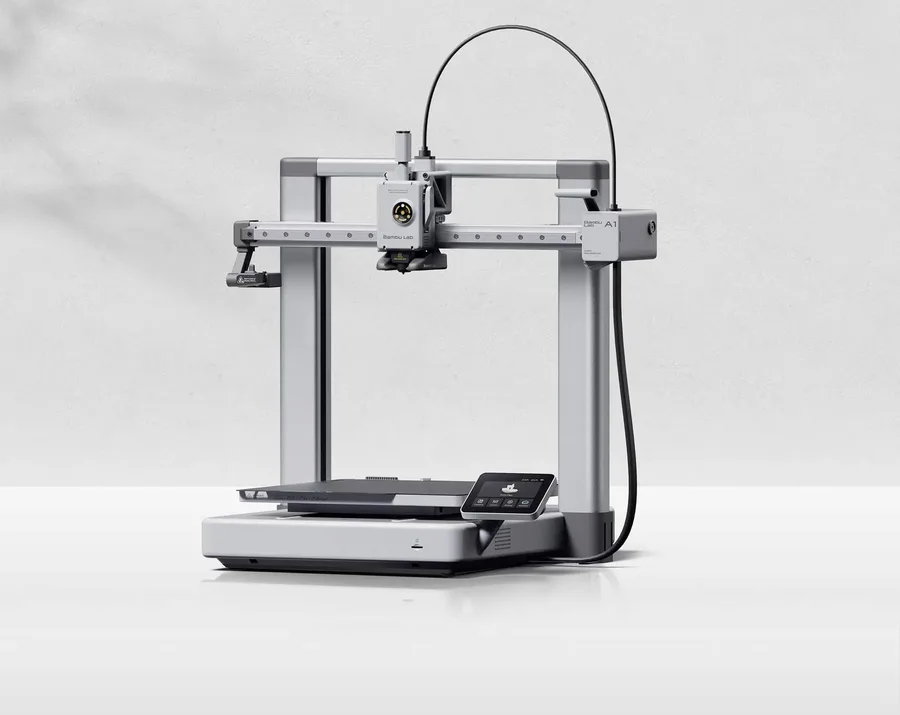
Bambu Lab A1
256 × 256 × 256 mm
More space on every axis than the A1 mini, while keeping the A1 family workflow.
An open frame does not provide the same thermal conditions as an enclosed printer. Choose materials accordingly.
Specifications and sellerElegoo Mars 5 Ultra
153.36 × 77.76 × 165 mm
A second documented resin format to compare with the larger Saturn 4 Ultra 16K.
The cover does not replace a suitable resin workspace. Plan washing, curing and consumables.
Specifications and sellerSources and limits
- Prusa Knowledge Base — FFF/FDM (Glossary)
- Prusa Knowledge Base — Types of printers and their differences
- Elegoo — How to Do Resin 3D Printing, Beginner's Guide
- Formlabs — FDM vs. SLA vs. SLS: 3D Printing Technology Comparison
- Prusa Knowledge Base — Cooling
We organize manufacturer and community documentation; we have not measured these products ourselves. The manual for your exact model takes precedence over general guidance.
A clearer shortlist starts with your projects.
Use the free buying checklist and budget worksheet before comparing offers.