
Anycubic 3D Printer: Understanding the Lineup and the Brand
Anycubic covers both FDM and resin with sizable Kobra and Photon lineups, backed by its own multicolor system and post-processing stations. This page breaks down that lineup from the manufacturer's own documentation, so you know where each family of machines fits before comparing.
Find My 3D Printer editorial team·Published September 10, 2026·Manufacturer documentation, no hands-on tests claimed

The short answer
Anycubic is a Chinese 3D printer manufacturer covering FDM with the Kobra 3, Kobra S1, and Kobra 2 series, and resin with the Photon Mono lineup and the Photon M7, per anycubic.com. The brand also offers the ACE Pro multicolor system, Wash & Cure stations for resin, and two slicers, Anycubic Slicer Next and Photon Workshop. Choosing between FDM and resin, and then between Anycubic's own models, comes down to the job at hand, whether you need an enclosed chamber, and whether multicolor printing matters to you, not a universal ranking.
Who is Anycubic, and what does its lineup cover today?
Anycubic is a Chinese 3D printer manufacturer active in both FDM and resin, with a catalog spanning entry-level machines up to more advanced models like the enclosed, CoreXY Kobra S1. Per anycubic.com, the brand builds its lineup around two main families, the Kobra series for FDM and the Photon series for resin, rounded out by accessories and in-house software.
That dual FDM-and-resin presence sets Anycubic apart from manufacturers focused on a single process, with the upside of staying inside the same software and accessory ecosystem no matter which machine type you pick. It also means picking the right family for the job before comparing individual models.
The Anycubic FDM lineup: Kobra 3, Kobra S1, and Kobra 2
The Kobra S1, the only Anycubic printer in our catalog, is an enclosed, CoreXY FDM machine with a nominal 250 x 250 x 250 mm build volume per our Kobra S1 page, a hotend rated up to 320°C, and automatic LeviQ 3.0 leveling. It sits above the Kobra 3 and Kobra 2, two older series that are generally more open-frame per anycubic.com.
The Kobra 3, sold in several variants including a Combo bundle paired with the ACE Pro for multicolor per the Anycubic wiki, occupies the mid-tier of the brand's FDM lineup. The older Kobra 2 sits at the entry level, with specs that are worth confirming precisely for the exact version before buying, since product listings change fairly often.
Per our catalog page, the Kobra S1 also adds automatic flow and vibration compensation during printing, a feature meant to cut down on manual tuning compared with more basic machines in the Kobra 2 lineup.
The Anycubic resin lineup: Photon Mono and Photon M7
On the resin side, the Photon Mono series spans several generations of monochrome-LCD MSLA printers, while the Photon M7 is a newer, faster model per store.anycubic.com. As with most resin manufacturers, these machines need a dedicated washing and curing space beyond the printer itself.
The Photon M7 line comes in several variants, including a Pro and a large-format Max version per Anycubic's product pages, with speed and build volume differences worth comparing carefully against your needs. None of these resin machines currently have a dedicated page in our catalog, unlike the Kobra S1 on the FDM side.
Both the Photon Mono and Photon M7 lines run compatible 405 nm UV resins, with exposure settings tied to each manufacturer profile per store.anycubic.com, so screen resolution alone doesn't tell the whole story on achievable detail. As with any resin printer, the resin, the profile, and the post-curing routine all matter as much as the hardware itself.
ACE Pro and multicolor printing at Anycubic
The ACE Pro is Anycubic's multicolor system, an external unit that feeds filament to the printer and, per the manufacturer's documentation, supports up to four colors with one unit and up to eight when combining two ACE Pro units. It also includes a filament-drying function that runs while printing, a feature Anycubic regularly highlights.
On the Kobra S1 specifically, our catalog page notes that the ACE Pro is sold separately from the printer and that TPU 95A isn't compatible with multicolor feeding, a limitation worth checking if flexible filament is part of your workflow. Our guide to understanding multicolor printing covers the different multicolor approaches across brands in more depth.
The ACE Pro relies on intelligent filament color identification to sync loaded spools, per Anycubic's documentation, a feature meant to cut down on mismatches between the sliced model and the color actually loaded.
Anycubic software: Anycubic Slicer Next and Photon Workshop
For FDM, Anycubic ships Anycubic Slicer Next, a slicer built on OrcaSlicer per the Anycubic wiki documentation, which brings most of that open-source slicer's advanced features while adding profiles specific to Anycubic machines. That shared foundation makes switching to or from another OrcaSlicer-based slicer relatively straightforward.
For resin, the brand offers Photon Workshop, its dedicated slicer for the Photon Mono and M7 printers, separate from Anycubic Slicer Next. Both tools are free and ship with ready-made profiles for their respective machines, a starting point worth fine-tuning for the resin or filament you actually use.
Which Anycubic printer fits which job?
For functional parts that benefit from an enclosed chamber and steady thermal control, the Kobra S1 is the most documented Anycubic model in our lineup, particularly for draft-sensitive materials like ABS or ASA; our guide to enclosed 3D printers covers why that matters for those filaments. If multicolor printing is a priority, adding an ACE Pro to the Kobra S1 or picking a Kobra 3 Combo is worth comparing, keeping in mind the accessory is usually sold separately from the printer.
For miniatures or parts needing very fine detail, the Photon Mono or Photon M7 resin lineup remains the most documented Anycubic option, at the cost of a dedicated post-processing space and a Wash & Cure station to automate washing and curing. That same FDM-versus-resin logic applies across every brand on the site: our guide to understanding multicolor printing and the comparison tool help you weigh the actual specs before deciding.
What to check before buying an Anycubic printer
The main thing to watch for in Anycubic's lineup is what's actually included in a bundle: the ACE Pro isn't always bundled with the printer, and combo offers like a Kobra 3 Max paired with the ACE 2 Pro change configuration fairly often per the manufacturer's product pages. Checking exactly what a listing includes, printer alone or combo, avoids surprises after checkout.
Build volume relative to price, plus the breadth of available accessories, comes up often in feedback on Anycubic products, alongside documentation that's generally solid but sometimes less centralized than some competitors'. To compare the Kobra S1 against other enclosed printers on the site, check the Kobra S1 page, the comparison tool, and our pages on Elegoo or Prusa.
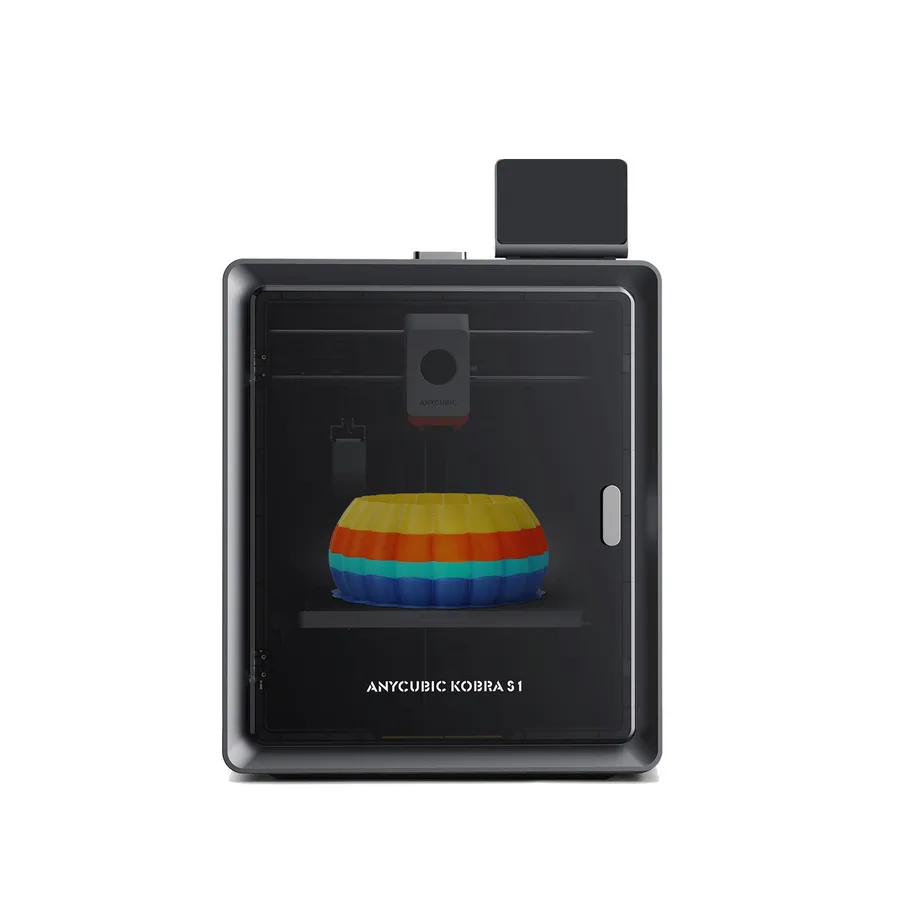
Anycubic Kobra S1
250 × 250 × 250 mm
A 320°C hotend and enclosed structure make it a candidate for comparison with other enclosed CoreXY machines.
The printer alone is single-color. TPU 95A compatibility does not extend to multicolor feeding through ACE Pro.
Specifications and sellerSources and limits
- Anycubic — ACE Pro
- Anycubic — Kobra S1
- Anycubic Wiki — Kobra 3 Combo
- Anycubic Wiki — Anycubic Slicer Next (Orca)
- Anycubic — Photon Mono M7
- Anycubic — Wash & Cure stations
We organize manufacturer and community documentation; we have not measured these products ourselves. The manual for your exact model takes precedence over general guidance.
A clearer shortlist starts with your projects.
Use the free buying checklist and budget worksheet before comparing offers.