
For CoreXY without the enclosure
Creality K1 SE
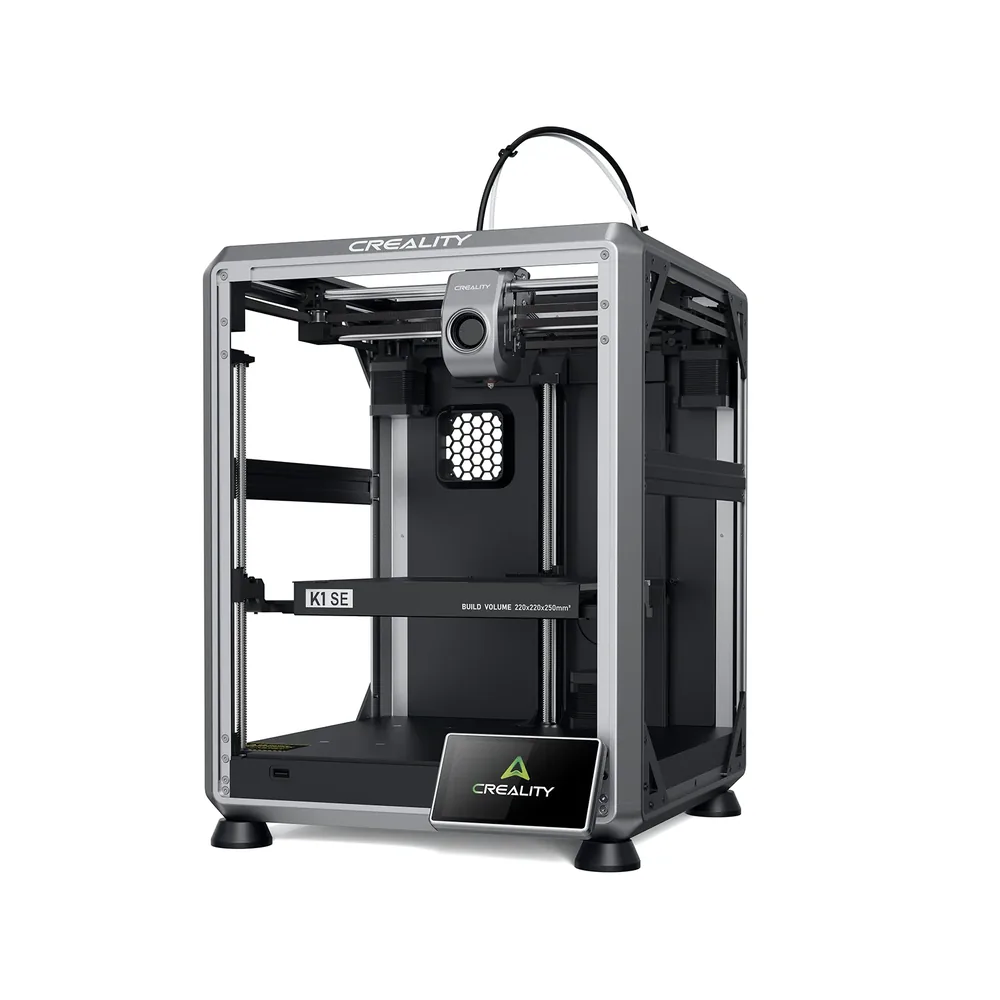
An open-frame CoreXY FDM printer with a 220 × 220 × 250 mm nominal build volume and a nozzle rated up to 300°C.
In short The Creality K1 SE is an open-frame filament (FDM) 3D printer with a 220 × 220 × 250 mm (8.7 × 8.7 × 9.8 in) build volume. Creality claims a 600 mm/s top speed, a 300 °C (572 °F) nozzle and a 100 °C (212 °F) bed; the printer measures 355 × 355 × 482 mm (14 × 14 × 19 in) and weighs 10.2 kg (22.5 lb).
Documentary analysis · Not personally tested
 FDM · Open frame
Why consider it?
CoreXY kinematics, hands-free auto-leveling, and a quick-swap tri-metal nozzle, in a lighter and cheaper package than the K1.
What to verify
Open frame despite the K1's CoreXY kinematics: no enclosure for ABS or ASA in regular use, unlike the enclosed K1.
Creality K1 SE specifications
- Technology
- Filament (FDM)
- Build volume
- 220 × 220 × 250 mm (8.7 × 8.7 × 9.8 in)
- Printer dimensions
- 355 × 355 × 482 mm (14 × 14 × 19 in)
- Weight
- 10.2 kg (22.5 lb)
- Enclosure
- Open frame
- Claimed top speed
- 600 mm/s
- Claimed acceleration
- 20,000 mm/s²
- Max nozzle temperature
- 300 °C (572 °F)
- Max bed temperature
- 100 °C (212 °F)
- Multicolor
- No stock multicolor system; a monochrome base machine per Creality.
- Materials
- PLA, PETG, and materials compatible with the quick-swap tri-metal nozzle, per Creality's listing.
- Screen
- 4.3-inch touchscreen
- Built-in camera
- No
- Connectivity
- Ethernet, USB
- Listed features
- Auto bed leveling, filament runout sensor
How much space does it need?
The Creality K1 SE measures 355 × 355 × 482 mm (14 × 14 × 19 in) for a 220 × 220 × 250 mm (8.7 × 8.7 × 9.8 in) build volume: the dashed box is the printer, the solid cube the nominal build volume, about 20% of the machine’s volume. Add room for the spool or multicolor unit, cables and ventilation.
Source: official Creality pages (creality.com), checked September 28, 2026. Manufacturer claims, not our measurements. Build volume is nominal: orientation, supports and reserved zones can reduce the usable space.
Which projects is it for?
The K1 SE is an open-frame CoreXY FDM printer with a 220 × 220 × 250 mm nominal build volume per Creality. Unlike the enclosed K1 in the same family, this SE version keeps the fast CoreXY kinematics but drops the enclosure, positioning it as a more accessible option for speed without the closed chassis.
Hands-free auto-leveling and a pre-assembled build aim for a quick start, in line with other 'SE' models in Creality's lineup designed to simplify first use.
Materials and configuration
The quick-swap tri-metal nozzle (copper body, steel tip, titanium heat break) heats up to an advertised 300°C thanks to a 60 W ceramic heater. This architecture stays close to the Ender-3 V3 KE's, with CoreXY kinematics added.
Without an enclosed chamber, the machine is recommended for PLA and PETG in regular use, with ABS and ASA needing more care due to less stable thermal conditions.
What the bundle includes or not
Creality highlights 8 GB of file storage, STL/OBJ/3MF compatibility, OTA firmware updates, and Creality Cloud integration, along with transfer via USB drive, LAN, or cloud printing.
The exact box contents (plate, tools, test spool) should be checked on the retailer's listing before buying, since this detail isn't always spelled out on the product page.
Alternatives to compare
For an enclosed chassis with the same CoreXY architecture, the K1 adds an enclosure useful for ABS and ASA. For a newer, more complete version, the K1C 2025 combines an enclosure with wide material compatibility.
The Creality page covers the rest of the manufacturer's lineup, and the beginner's buying guide helps compare this model against other entry-level options.
Similar printers to compare
Sources and limits
- Source: official Creality pages (creality.com), checked September 28, 2026. Manufacturer claims, not our measurements.
- How we assess specifications
We have not measured noise, real printing speed, accuracy or reliability, so none of these is rated here.